How to produce a monthly PDF report for one of your org units, and how to read what's in it.
Who this is for: Managers (Quality Managers, Directors of Nursing, Matrons) who need a single document covering a month of quality activity, for a governance meeting, a board pack, or a service review.
Before you start
- Monthly reports live on the Reports Center tab, inside Reports. This is enabled per organisation, so if you don't see the tab, it isn't switched on for yours yet.
- You can only report on months that have finished. The current month isn't available until it ends.
- A report is a snapshot of one unit for one month. It covers the unit you pick and everything beneath it.
- Your Report History is your own. It lists the reports you generated, not your colleagues'. This is different from the Assessment Reports tab, which shows everyone's completed assessments.
Generate a report
- Open Reports from the left-hand menu, then the Reports Center tab.
- Under Select Org Unit, choose the unit you want the report for. You can pick any unit you have access to. Choose the level you'd actually present at: a hospital, a care home, a division.
- Under Time Period, the report type is fixed to Monthly. Pick the month you want. The list runs from the month the unit was created up to last month, newest first, with the most recent month already selected.
- Select Generate Report.
- The report appears at the top of Report History as Generating. This takes up to three minutes. You don't need to reload the page, it updates itself, and you can carry on working elsewhere and come back.
- Once it says Report ready, use Download to open the PDF. Save it, print it, or attach it wherever it needs to go.
Each report is named after the unit and the month, for example "Ward 5B - March 2026", and the row shows the unit type, the date you generated it, and the overall score for the month.
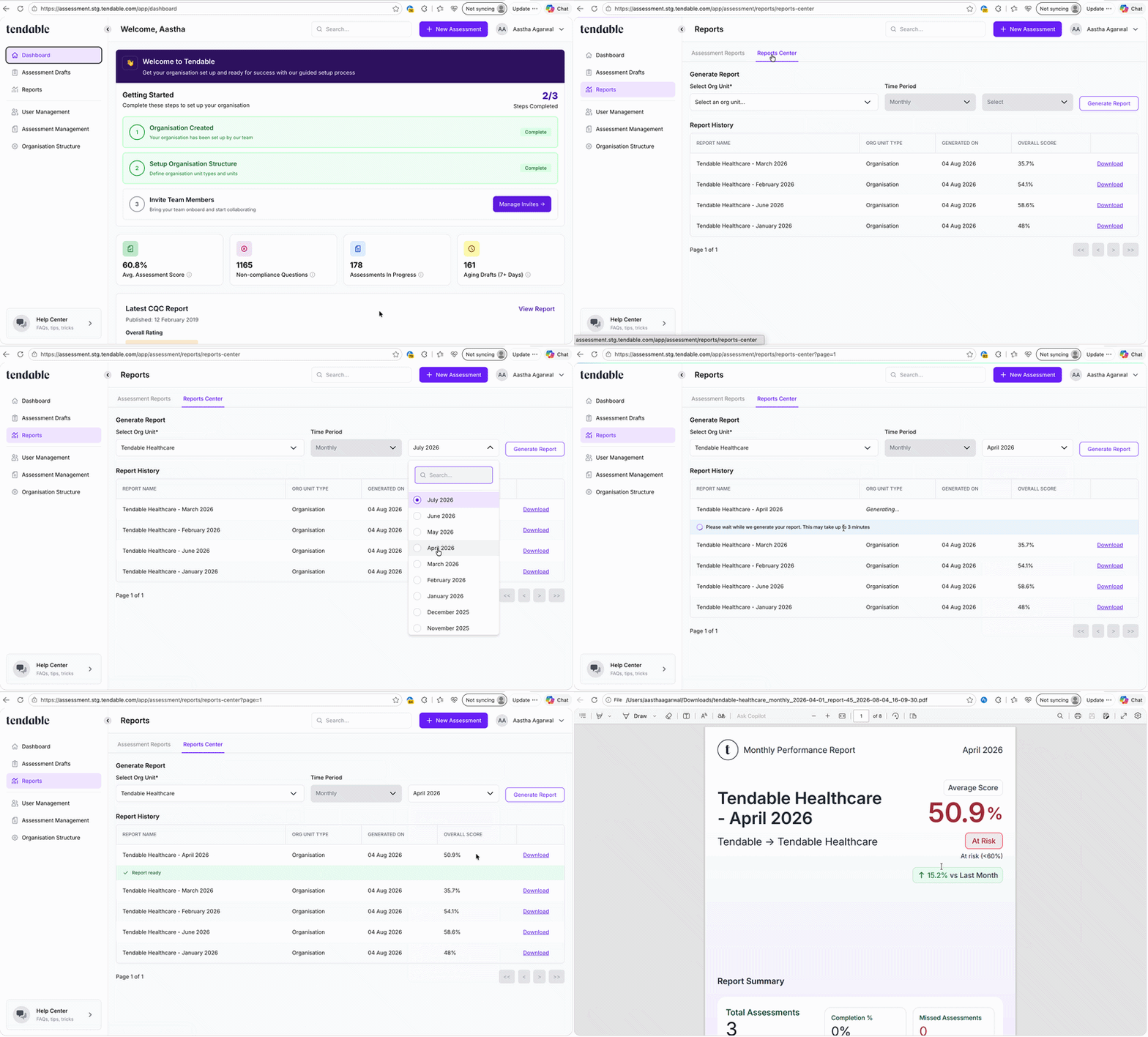
Generate a monthly report
Find a report
Open Reports from the left-hand menu and got to the Reports Centre tab. You'll see a list of monthly report for all organisation units , most recently added first.
Each row shows:
| Column | What it tells you |
|---|---|
| Report name | The organisation unit with the month that it was generated for. |
| Org unit [type] | The unit it was done on, for example "Ward 5B [Ward]". |
| Generated on | When it was created |
| Overall Score | The overall score, as a percentage. |
Use the page controls at the bottom to move through the list if there's more than one page.
What's in the report
The PDF is built in sections. Sections with nothing to show are left out, so a quiet month produces a shorter report.
| Section | What it gives you |
|---|---|
| Cover page | The unit, the month, its position in your organisation, the average score with a comparison against last month, and the headline summary figures. |
| Table of Contents | Clickable links to each section and its page number. |
| Performance Over Last 6 Months | A score trend chart with the reported month highlighted, and a month-by-month table of average score, completion, and non-compliances. Your "are we getting better" page. |
| Sub-Unit Level Summary | Every unit directly beneath the one you chose, ranked worst score first, with a distribution showing how many sit in each score band. If those units are all the same type, the section is named for it, for example Ward Level Summary. |
| Assessment Level Summary | The same view by assessment instead of by unit, so you can see which audits are dragging and which are solid. |
| Thematic Analysis | Your results grouped by the themes tagged on questions, with compliance per theme and which units are affected. The place to spot a problem that runs across several audits. |
| Non-Compliants | The individual questions that failed, split into Repeated and New, each with the answer given and the score. |
What the numbers mean
| Term | How it's worked out |
|---|---|
| Average Score | The average score of every assessment completed that month in your chosen unit and everything beneath it. |
| Total Assessments | How many assessments were completed in that scope during the month. |
| Org-Units Covered | How many units sit beneath the one you chose. It's the size of the report's scope, not a count of units that were assessed. |
| Non-Compliant | Individual questions that scored below 50%. |
| Repeated | A question that was also non-compliant the previous time the same assessment was done at that unit during the month. Something that was flagged and came back. |
| Completion % | Of the scheduled assessments due that month, how many were completed against their deadline. See Set up recurring assessments with a schedule. |
| Missed Assessments | Scheduled assessments that were due that month and weren't completed against their deadline. |
| Score bands | Good is 80 to 100%, Requires Improvement is 60 to 79%, At risk is below 60%. |
Tips & troubleshooting
- "This report has already been generated." You've generated this unit and month before. Tendable takes you straight to the existing report rather than building a duplicate. There's no way to refresh one, so if data for that month has changed since, the existing PDF won't pick it up.
- Generation failed. Select try again on the row (Retry on a phone). You get three retries. After that the row offers contact support, which opens a ticket for us.
- The month I want isn't in the list. Either it hasn't finished yet, or it's before the unit existed in Tendable. Only completed months since the unit was created are offered.
- "This org unit has no completed assessments yet." The unit was created this month, so it has no completed month to report on. Pick a unit that's been in Tendable longer, or wait for the month to end.
- Non-Compliants looks empty on a high-level report. That section only covers assessments carried out on the unit you selected, not on the units beneath it. Since audits are usually done at ward or home level, a trust or division report will show few or none. For the failures underneath, run the report at that level, or use the Sub-Unit Level Summary and Thematic Analysis sections, which do cover everything beneath.
- The Sub-Unit Level Summary doesn't list every ward. It lists the units directly beneath the one you chose. Anything deeper is rolled up into whichever of those it sits under. A trust report shows hospitals, not individual wards.
- There's no Thematic Analysis section. Themes come from tags on questions. If your assessments don't have them, there's nothing to group by. Talk to us about adding them.
- A colleague's report isn't in my history. Report History only shows what you generated. Ask them to share the PDF, or generate your own for the same unit and month.
Related articles
- Assessment reports and dashboard
- Set up recurring assessments with a schedule
- Review the results of a completed assessment
- How your organisation structure works
Was this article helpful?
That’s Great!
Thank you for your feedback
Sorry! We couldn't be helpful
Thank you for your feedback
Feedback sent
We appreciate your effort and will try to fix the article