Actions Management is an Admin Portal feature that keeps your actions list clean and trustworthy, without the manual admin grind. Instead of reviewing and archiving actions one by one, admins set up a small number of rules once, and Tendable applies them automatically from then on.
Each rule is optional, fully configurable by anyone with Organisation Admin access. You can preview the items that will be archived by each rule, so admins keep full control without losing oversight.
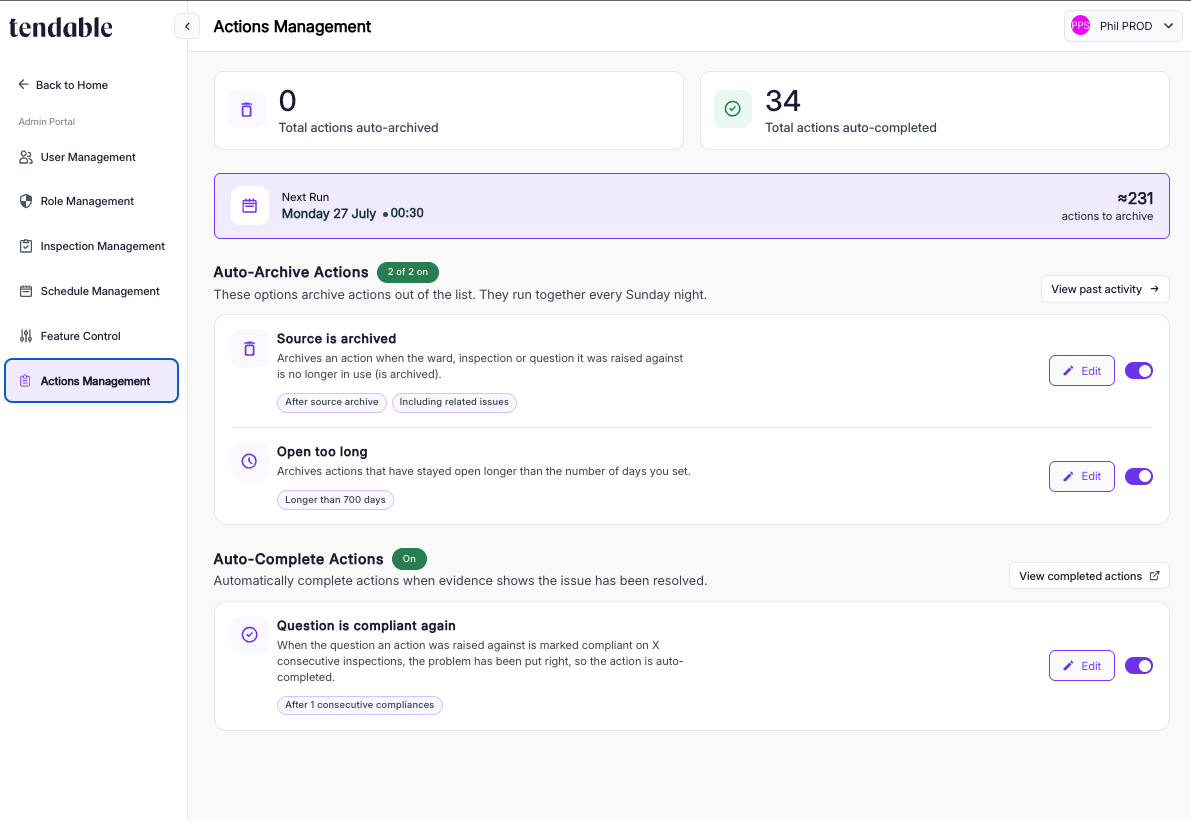
Where to find it
Actions Management sits in the Admin Portal - click here to view it.
Auto-Archive Actions
Two rules auto-archive actions. They run independently of each other but on the same schedule: together, every Sunday night. Next Run: the date and time of the next scheduled clean-up, plus an estimate of how many actions are currently queued for archiving.
Rule 1: Source is archived
Every time an inspection is removed, a ward closes or a question gets rewritten, it can leave dead actions behind, pointing at a source that no longer exists. Left alone, someone has to notice and clean these up by hand, or more likely nobody does, and the list quietly fills with clutter people stop trusting. This rule catches it automatically: when the ward, inspection, or question an action was raised against has already been archived, the related actions are removed.
- Once enabled, affected actions get a 30-day grace period before archiving; nothing is removed immediately.
- After the grace period, actions join the queue and archive together in the Sunday night batch.
- Admins can also choose to archive related issues at the same time, so residual issues don't skew reporting.
- 'View Affected Actions' shows exactly which actions this rule will affect, based on the currently saved settings.
Rule 2: Open too long
Most actions that get resolved are resolved within 30 days. Anything still open a year later isn't a live risk, it's noise burying the things that do need attention. This rule archives actions once they've stayed open longer than a threshold you set.
- Set the 'Archive actions older than' field to whatever fits your organisation; many start around 365 days.
- Rule timing - aActions meeting the threshold join the queue and archive together in the Sunday night batch.
- The day count runs from when the action was first raised.
- As with Rule 1, affected actions can be reviewed before anything changes.
Past Activity
Every weekly run is logged. Select 'View past activity' under Auto-Archive Actions for a full audit trail: run date, how many actions were archived, whether it completed successfully, and a link to those actions in the actions list.
Auto-Complete Actions
Rule 3: Question is compliant again
When a team genuinely fixes a problem, and proves it repeatedly across real inspections, the paperwork shouldn't lag behind reality. This rule completes an action automatically once the question that triggered it comes back compliant on a set number of inspections in a row, so the list reflects what's actually true.
- Set the number of consecutive compliant inspections needed via the 'Complete After' dropdown (one, two, or three).
- Rule timing - unlike the archive rules, this one doesn't wait for Sunday. Actions complete immediately once a qualifying inspection is submitted.
- 'View Completed actions' shows which actions in the list were auto-completed.
Was this article helpful?
That’s Great!
Thank you for your feedback
Sorry! We couldn't be helpful
Thank you for your feedback
Feedback sent
We appreciate your effort and will try to fix the article