How to accept your invitation, create a password, and finish setting up your Tendable account.
Who this is for: Anyone who's been invited to Tendable, in any role.
Before you start
- You need the invitation email sent to you by your organisation.
- The invite link is valid for 7 days. If it's expired, ask whoever invited you to send a new one.
- Your email address, role, and site are already set by your administrator. You can't change them yourself, and will need to reach out to your organisation's administrator to make any changes.
Steps
- Open your invitation email and select the link. You'll see "[Name] invited you to join Tendable!" with your email already filled in.
- Create a password and confirm it (see the rules below), then select Continue.
- Complete your profile:
- Enter your full name (required).
- Add a job title if you'd like (optional).
- Add a profile photo if you'd like. This is the only place you can add a photo, so do it now if you want one.
- Review your details. Your role and site are shown but fixed. If you need access to more sites later, contact your administrator. Select Complete Setup.
- You're signed in and ready to go. From now on, signing in will also ask for a verification code sent to your email (this is your two-step verification).
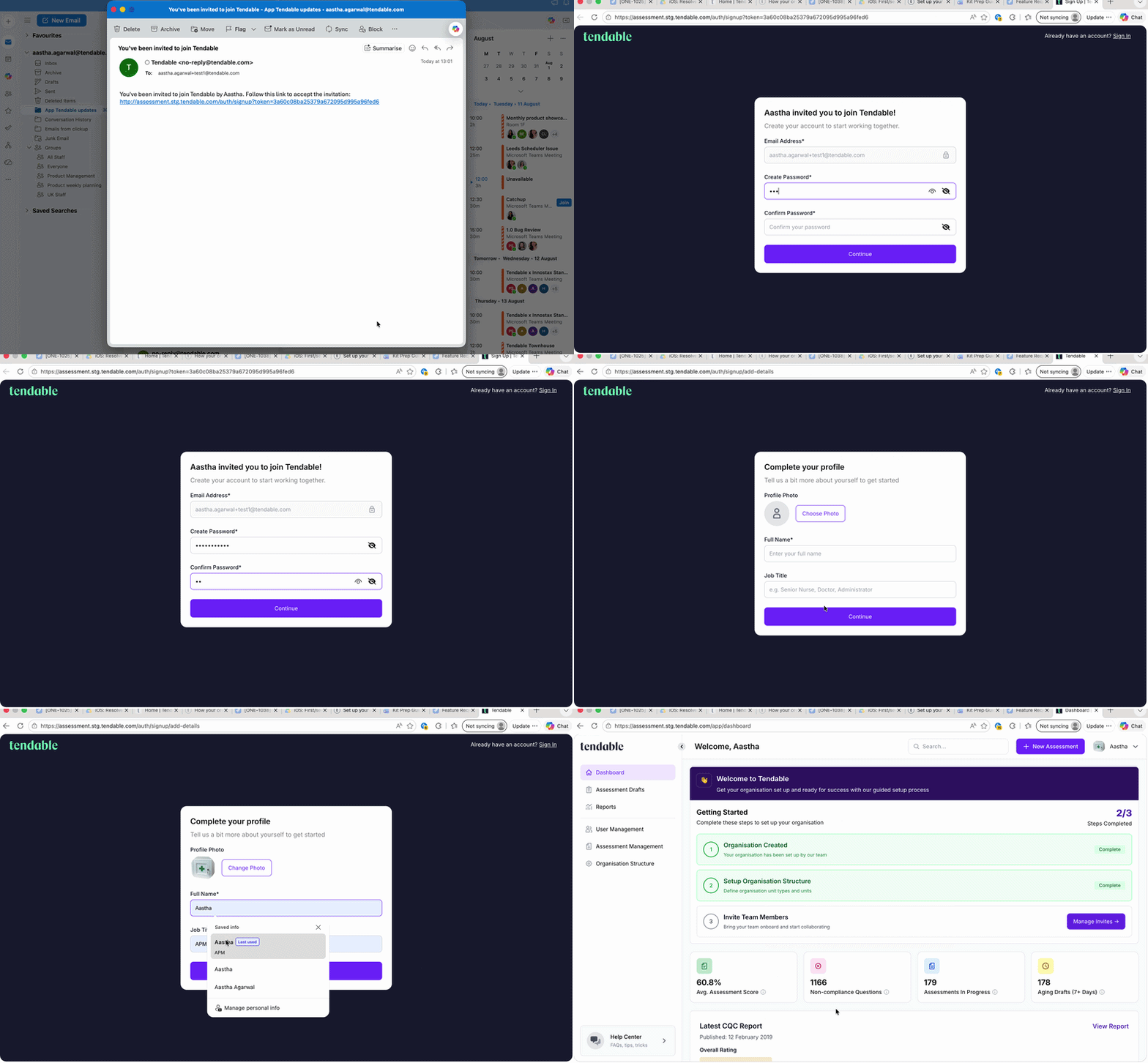 Set up your account from invite email
Choosing a password
Your password needs to be at least 8 characters and include:
- one uppercase letter,
- one lowercase letter,
- one number,
- one special character (for example ! ? @ #),
- and no spaces.
Tips and troubleshooting
- "This invite has expired." The 7 days have passed. Ask whoever invited you to resend it.
- "An account with this email already exists." You've already set up your account. Just sign in instead, and use Reset your password if you've forgotten it.
- The email address shown is wrong. It's locked to your invitation. If it's incorrect, contact whoever invited you so they can re-invite the right address.
- Your password won't save. Check it meets all the rules above, especially a special character and no spaces.
Related articles
- Sign in to Tendable
- Reset your password
- Invite people to Tendable (for the administrator who sends invites)
- View your profile and account details
Was this article helpful?
That’s Great!
Thank you for your feedback
Sorry! We couldn't be helpful
Thank you for your feedback
Feedback sent
We appreciate your effort and will try to fix the article